
Effective, Consistent and Reliable
Method for Collecting Student Assessment Data
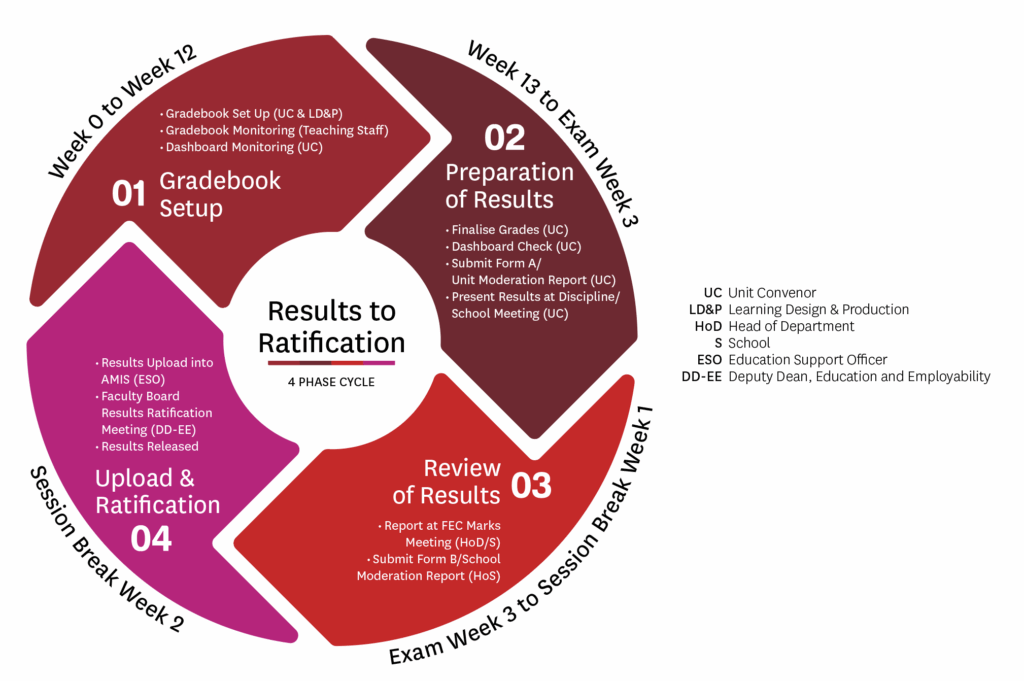
The R2R process is executed in four phases each session: distinct groups of staff will be primarily responsible during different phases, according to their roles and expertise within the assessment and ratification process

Who will be involved in the process?
To ensure a seamless ratification process, the involvement of Unit Convenors, Heads of Discipline and Heads of School, Education Support Officers, and the Learning Design and Production Team is essential. Each group plays a role at different stages, from initial review to final approval and implementation.
The Faculty of Arts adheres to the Unit of Study Monitoring and Grade Ratification Policy and Procedures, which supports the assurance, enhancement, and improvement of the quality, integrity, and relevance of the University's suite of units of study.
Nuances in rounding, records and ratification
Understanding ceiling rounding in R2R
Result Rounding Approach
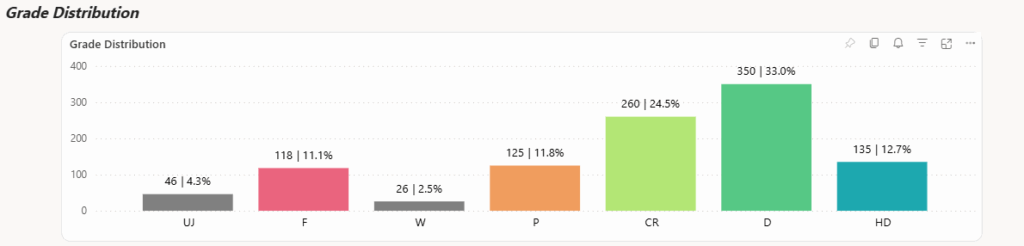
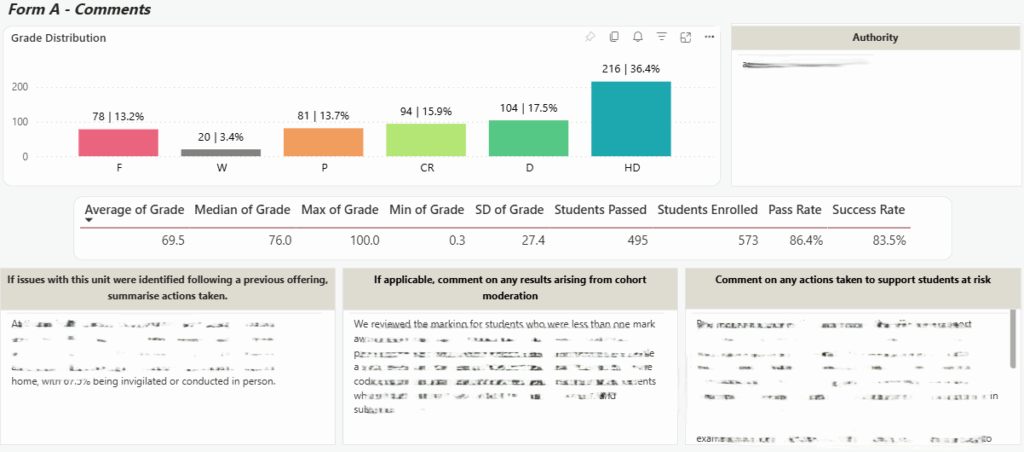
Data visualised in the Unit Monitoring and Grade Ratification dashboard has rounding applied at the Gradebook category level and then at the Final/Final adjusted mark level.
Rounding at Gradebook Category level (mathematical)
-
Default rounding to 1 decimal place in PowerBI for raw Gradebook Category marks.
-
e.g., A 'Quiz' category mark of 16.38141 is displayed as 16.4.
-
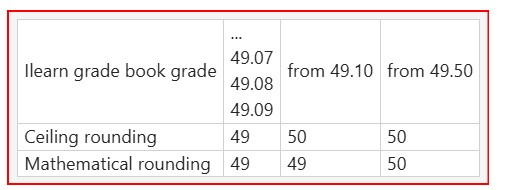
Rounding of Final/Final adjusted mark (special)
-
Step 1: Confirm the final Gradebook mark (already rounded to 2 decimal places) before applying special rounding
-
Step 2: Using the Gradebook mark (already rounded to 2 decimal places)
-
marks with a decimal of 0.10 or higher are rounded up to the nearest whole number
-
marks with a decimal of 0.09 or lower are rounded down
-
Students without any submissions
Where a student has not submitted any assessment, enter a mark of 0 in any column (can be also from a non assessed knowledge check) so that the Gradebook and R2R dashboard calculate correctly and avoid system errors. This does not disadvantage the student, but it ensures their record is complete and can be included reliably in monitoring and ratification workflows.
Dashboard syncing times
During peak periods around results ratification, the R2R dashboard is refreshed several times a day (for example, overnight and at key points during the day). Allow up to 1.5 hours for changes made in iLearn or the Gradebook to flow through, and avoid making high-stakes decisions on dashboard data while a refresh is still in progress.
Changes to grades after ratification
Once Faculty Board has ratified results, any changes to final grades must follow the formal post‑ratification process. Requests should be submitted via Salesforce or by contacting the Arts Education Services team (arts.esd.admin@mq.edu.au).
Results to Ratification Process Timeline
Find a downloadable Timeline Checklist here
|
Academic Week |
Process |
|
Week 0/ Session Start |
|
|
Throughout the Session |
|
|
Week 13 |
|
|
Exam Weeks 1 & 2 |
|
|
Exam Week 3 |
|
|
Session Break Week 1 |
|
|
Session Break Week 2 |
|